Hexo 搭建个人博客

概述

什么是 Hexo?

Hexo 是一个快速、简洁且高效的博客框架。Hexo 使用 Markdown(或其他渲染引擎)解析文章,在几秒内,即可利用靓丽的主题生成静态网页。

准备环境

NodeJs安装

从官网https://nodejs.org/en/ 下载,直接安装即可,测试一下

1
2
3
4
node -v
# v11.15.0
npm -v
# 6.7.0Copy

npm修改源

获取npm源

1
npm get registryCopy

修改npm源

1
npm config set registry http://registry.npm.taobao.org

如果想重置回去

1
npm config set registry https://registry.npmjs.org

安装Git

从官网https://git-scm.com/download/win 下载,直接安装即可

设置邮箱和用户名

1
2
git config --global user.name  ****			# 设置用户名(gitee的注册昵称)
git config --global user.email *****@**.com # 设置gitee邮箱(gitee的注册邮箱)Copy

查看用户名

1
2
git config user.name
git config user.email

生成 ssh

1
$ ssh-keygen -t rsa -C "youremail"   //你的邮箱

连按三次回车 才能成功 下面是秘钥位置

1
2
Generating public/private rsa key pair.
Enter file in which to save the key (/c/Users/dwy/.ssh/id_rsa):

找到id_rsa.pub 文件

ssh,简单来讲,就是一个秘钥,其中,id_rsa是你这台电脑的私人秘钥,不能给别人看的,id_rsa.pub是公共秘钥,可以随便给别人看。把这个公钥放在GitHub上,这样当你链接GitHub自己的账户时,它就会根据公钥匹配你的私钥,当能够相互匹配时,才能够顺利的通过git上传你的文件到GitHub上。

而后在GitHub的setting中,找到SSH keys的设置选项,点击New SSH key
把你的id_rsa.pub里面的信息复制进去。

原文链接:https://blog.csdn.net/sinat_37781304/article/details/82729029

img

安装hexo
1
npm install -g hexo-cliCopy

建站部署

安装 Hexo 完成后,请执行下列命令,Hexo 将会在指定文件夹中新建所需要的文件。

1
2
3
4
5
6
7
# 初始化博客文件夹
hexo init <folder>
<folder> 为任意文件名称 例如 hexo init hexodome
# 进入博客目录
cd <folder>
# 安装
npm installCopy

新建完成后,指定文件夹的目录如下:

1
2
3
4
5
6
7
8
.
├── _config.yml 博客配置文件
├── package.json
├── scaffolds 文章生成模板
├── source 文章
| ├── _drafts
| └── _posts 文章都放这里了
└── themes 主题

这样hexo就安装完成了,接下来就可以启动hexo

1
2
3
hexo clean		    # 清除所有记录
hexo generate # 生成静态网页
hexo server -p 4000 # 启动服务Copy

本地预览

1
2
3
4
5
6
# 清除所有记录
hexo clean
# 编译项目,输入命令:
hexo g
# 运行项目,输入命令:
hexo sCopy

在浏览器地址栏输入 http://localhost:4000/ 就能看到效果啦

部署到Gitee

安装插件
1
npm install hexo-deployer-git --saveCopy

修改站点配置文件
1
2
3
4
5
6
7
8
9
10
# URL
url: https://gitee.com/valten/blog
root: /blog/

# Deployment
## Docs: https://hexo.io/docs/deployment.html
deploy:
type: git
repo: git@gitee.com:valten/blog.git
branch: developCopy

部署
1
hexo clean && hexo g && hexo dCopy

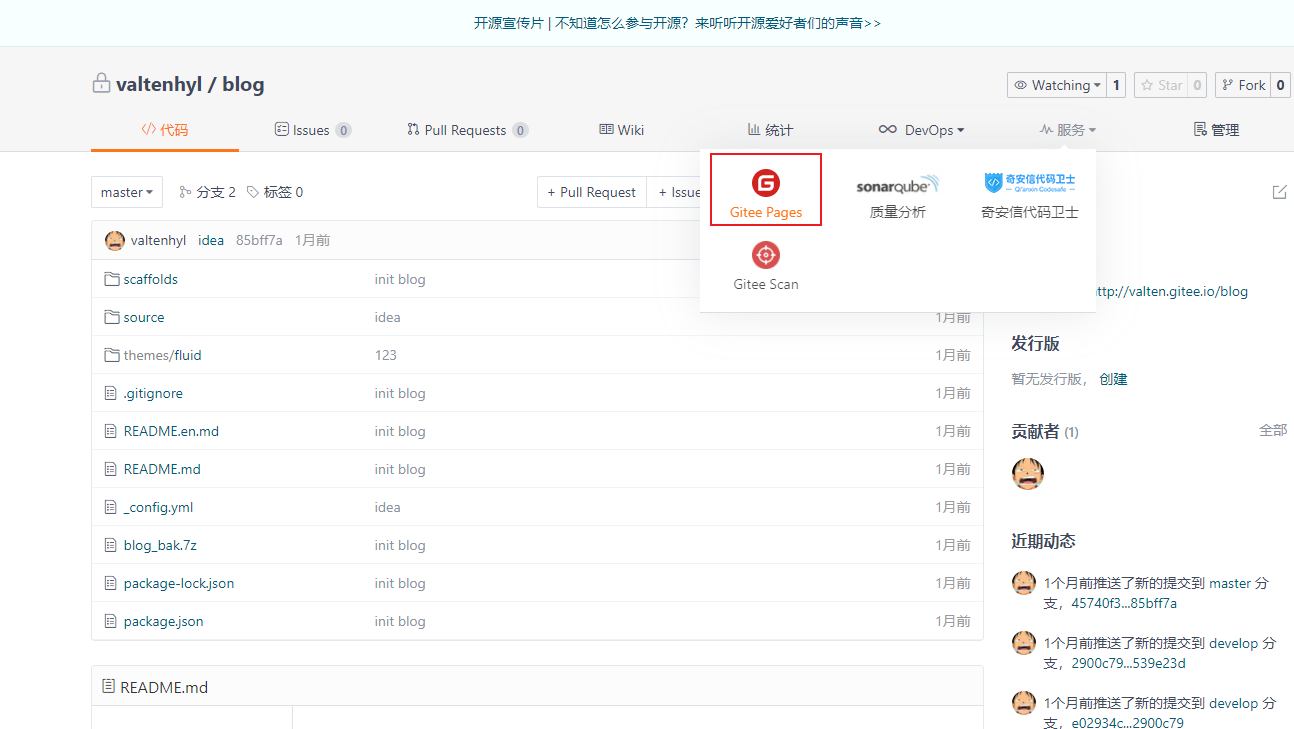
进入gitee仓库,找到服务,选择Gitee Pages

https://jsd.cdn.zzko.cn/gh/valtenhyl/filebed@master/filebed/giteepage.png

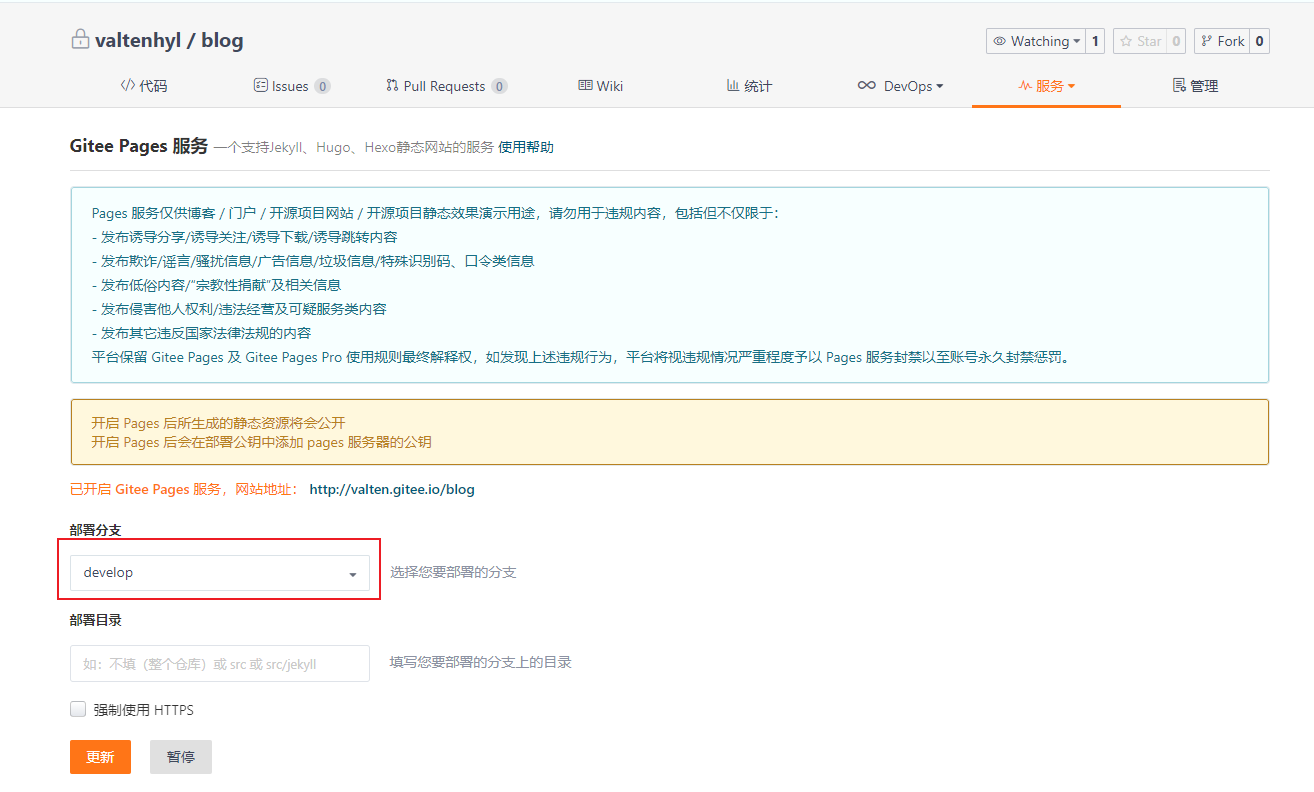
选择部署分支,我这里是develop分支,然后点击更新即可

img

测试

浏览器地址输入 https://gitee.com/valten/blog

部署到Github

安装插件
1
npm install hexo-deployer-git --saveCopy

修改站点配置文件
1
2
3
4
5
6
7
8
9
10
# URL
url: https://valtenhyl.github.io
root: /

# Deployment
## Docs: https://hexo.io/docs/deployment.html
deploy:
type: git
repo: git@github.com:valten-hyl/valtenhyl.github.io.git
branch: deployCopy

部署
1
hexo clean && hexo g && hexo dCopy

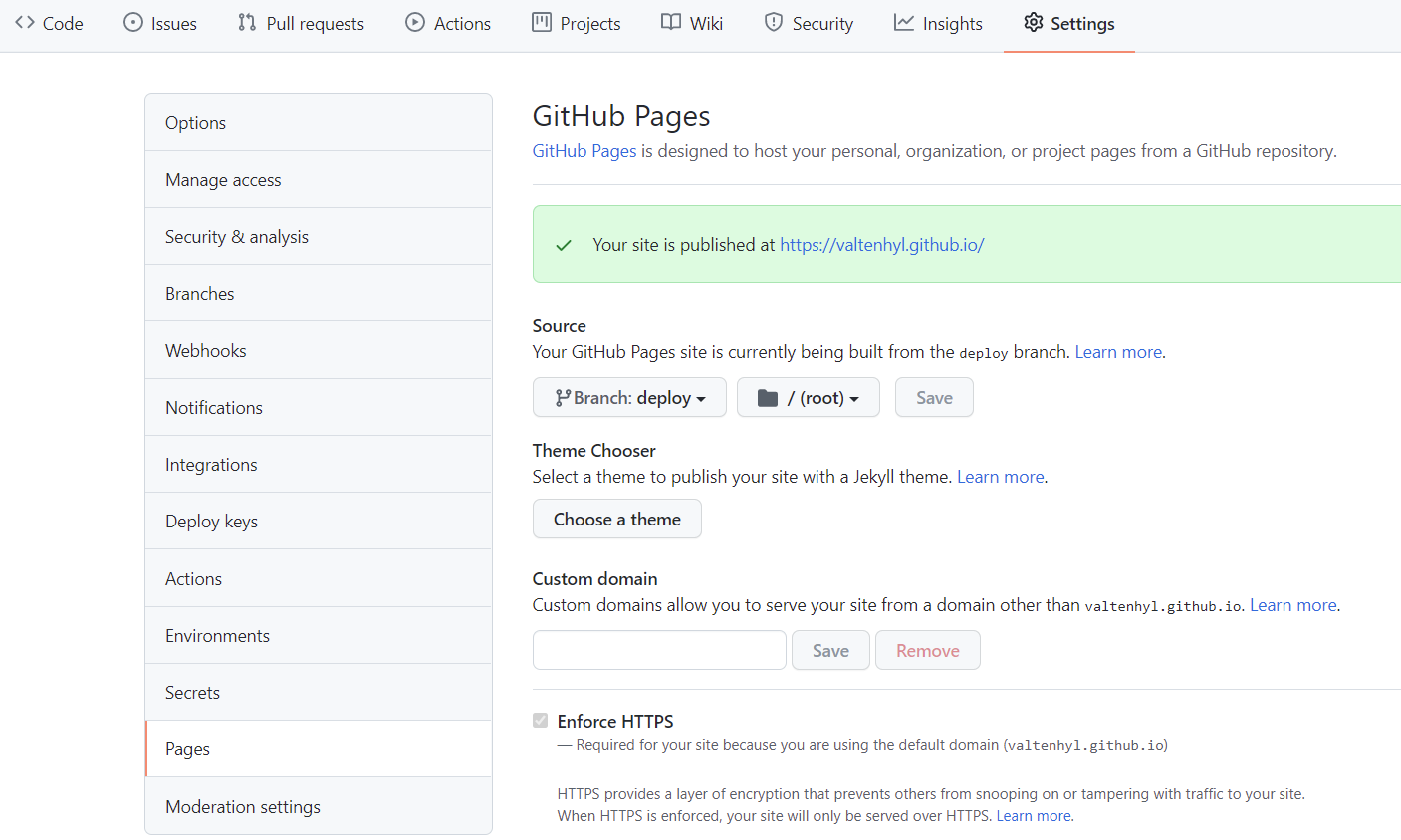
进入github仓库,找到项目,选择Settings,选择Pages,Source选择部署的时候的分支,点击Save按钮保存即可

img

测试

浏览器地址输入 https://valtenhyl.github.io

最后我还是选择了Gitee。

为什么使用Gitee而不使用GitHub

1、GitHub Pages访问龟速不稳定;

2、GitHub私有仓库收费,而Gitee私有仓库免费;

配置优化

分类和标签

定义分类页
1
hexo new page categoriesCopy
1
2
3
4
5
---
title: 分类
date: 2019-12-14 10:56:27
type: "categories"
---Copy

定义分类页
1
hexo new page tagsCopy
1
2
3
4
5
---
title: 标签
date: 2019-12-14 10:56:27
type: "tags"
---Copy

文章添加分类和标签属性
1
2
3
4
5
6
7
8
9
10
11
12
---
title: SpringBoot+Mybatis 通过databaseIdProvider支持多数据库
date: 2019-12-14 16:42:51
tags:
- Spring Boot
- Mybatis
- databaseIdProvider
- 多数据库
categories:
- [Java,Spring Boot] # 多级标签
- Mybatis
---Copy

修改主题配置文件,显示分类和标签菜单

1
2
3
4
5
6
7
8
9
10
# External url should start with http:// or https://
menu:
home: / || home
categories: /categories/ || th
tags: /tags/ || tags
archives: /archives/ || archive
#about: /about/ || user
#schedule: /schedule/ || calendar
#sitemap: /sitemap.xml || sitemap
#commonweal: /404/ || heartbeatCopy

关于

1
hexo new page aboutCopy

修改主题配置文件,显示关于

1
2
3
4
5
6
7
8
9
10
# External url should start with http:// or https://
menu:
home: / || home
categories: /categories/ || th
tags: /tags/ || tags
archives: /archives/ || archive
about: /about/ || user
#schedule: /schedule/ || calendar
#sitemap: /sitemap.xml || sitemap
#commonweal: /404/ || heartbeatCopy

编辑about目录下的index.md。

公益404

1
hexo new page commonwealCopy

修改主题配置文件,#commonweal: /404/ || heartbeat改成commonweal: /404.html || heartbeat

1
2
3
4
5
6
7
8
9
10
# External url should start with http:// or https://
menu:
home: / || home
categories: /categories/ || th
tags: /tags/ || tags
archives: /archives/ || archive
about: /about/ || user
#schedule: /schedule/ || calendar
#sitemap: /sitemap.xml || sitemap
commonweal: /404.html || heartbeatCopy

附上index.md

1
2
3
4
5
6
7
8
9
10
11
12
13
14
15
16
17
18
---
title: 404 Not Found:该页无法显示
date: 2019-12-14 17:40:17
permalink: /404
---
<!DOCTYPE html>
<html lang="zh-cn">
<head>
<meta charset="UTF-8" />
<title>404</title>
</head>
<body>
<script type="text/javascript"
src="//qzonestyle.gtimg.cn/qzone/hybrid/app/404/search_children.js"
homePageName="返回宝贝回家" homePageUrl="https://valten.gitee.io/blog">
</script>
</body>
</html>Copy

阅读全文按钮

在文章中想要预览的文字后加<!--more-->,这在之后的内容就会隐藏起来,点击Read More就会显示全文。

添加图片

1
2
3
4
5
6
7
8
9
10
---
title: Hello World
tags:
- Hello
- World
categories:
- Hello
photos:
- "http://q2gep6iwb.bkt.clouddn.com/blog/20191213/7Jk7p7nSUWpC.jpg"
---Copy

文章置顶

移除默认安装的插件:

1
npm uninstall hexo-generator-index --saveCopy

安装新插件:

1
npm install hexo-generator-index-pin-top --saveCopy

最后编辑有这需求的相关文章时,在Front-matter(文件最上方以—分隔的区域)加上一行:top: true
如果你置顶了多篇,怎么控制顺序呢?设置top的值(大的在前面),比如:

1
2
3
4
5
6
7
# Post a.md
title: a
top: 1

# Post b.md
title: b
top: 10Copy

文章 b 便会显示在文章 a 的前面。

添加萌宠看板娘

安装插件

1
npm install hexo-helper-live2d --saveCopy

安装想要的模型

1
npm install live2d-widget-model-shizuku --saveCopy

站点配置文件添加以下配置

1
2
3
4
5
6
7
8
9
10
11
12
13
14
15
16
17
18
19
20
21
# Live2D
## https://github.com/EYHN/hexo-helper-live2d
live2d:
enable: true # 开启live2d
scriptFrom: local # 默认
pluginRootPath: live2dw/ # 插件在站点上的根目录(相对路径)
pluginJsPath: lib/ # 脚本文件相对与插件根目录路径
pluginModelPath: assets/ # 模型文件相对与插件根目录路径
tagMode: false # 标签模式, 是否仅替换 live2d tag标签而非插入到所有页面中
debug: false # 调试, 是否在控制台输出日志
model:
# 选择哪种模型 https://huaji8.top/post/live2d-plugin-2.0/
# shizuku、wanko、hibiki、z16、haru、Epsilon2.1、koharu、haruto、
# npm install live2d-widget-model-wanko --save
use: live2d-widget-model-shizuku
display: #放置位置和大小
position: left
width: 150
height: 300
mobile:
show: false # 是否在手机端显示Copy

修改站点基本信息

1
2
3
4
5
6
7
8
# Site
title: 青衫不改 # 标题
subtitle: 小白の博客 # 副标题
description: 浮生若梦,为欢几何 # 描述
keywords: 'Hexo, NexT' # 网站默认关键词
author: valten
language: en
timezone: ''Copy

文章永久链接

修改站点配置文件

1
2
#permalink: :year/:month/:day/:title/
permalink: :category/:title

更换主题

主题推荐

hexo-theme-butterfly 主题

图片

1709193686628

githup地址

下载地址 git@github.com:jerryc127/hexo-theme-butterfly.git

项目名\themes 文件下 git clone git@github.com:jerryc127/hexo-theme-butterfly.git

1
2
# 下载主题
git clone https://github.com/theme-next/hexo-theme-next.git themes/nextCopy

注意有坑:这个主题有个缺失文件

npm install hexo-renderer-pug hexo-renderer-stylus 补齐 可以看下githup文档

下载好的主题文件

1709193171170

修改站点配置文件 _config.yml theme: 文件名称 这里用的红框里的

1709193222437

1
2
3
4
# Extensions
## Plugins: https://hexo.io/plugins/
## Themes: https://hexo.io/themes/
theme: next # 值为themes目录下主题文件夹的名称Copy

hexo-theme-fluid 主题

1709193708452

下载地址

1
git clone git@github.com:fluid-dev/hexo-theme-fluid.git

配置文件 _config.yml

1
theme: hexo-theme-fluid

查看效果

1
hexo clean && hexo g && hexo sCopy

社交链接

1
2
3
4
5
6
7
8
9
10
11
12
13
14
15
16
17
18
19
social:
GitHub: https://github.com/valtenhyl || github
E-Mail: mailto:valtenhyl@163.com || envelope
Weibo: https://weibo.com/3114281855 || weibo
简书: https://www.jianshu.com/u/9f816d1869d4 || book
掘金: https://juejin.im/user/5baa5f9d5188255c5d569951 || ils
#Google: https://plus.google.com/yourname || google
#Twitter: https://twitter.com/yourname || twitter
#FB Page: https://www.facebook.com/yourname || facebook
#StackOverflow: https://stackoverflow.com/yourname || stack-overflow
#YouTube: https://youtube.com/yourname || youtube
#Instagram: https://instagram.com/yourname || instagram
#Skype: skype:yourname?call|chat || skype
#RSS: /atom.xml || rss

social_icons:
enable: true # 是否在社交链接标签上显示图标
icons_only: true # 只显示图标
transition: false # 是否显示过渡效果 Copy

友情链接

1
2
3
4
5
6
7
8
9
10
11
# Blog rolls
links_settings:
icon: link # 链接图标
title: 友情链接 # 链接文字
# Available values: block | inline
layout: inline # 链接样式

links:
圣豪Boy: https://xshcloudy.gitee.io/blog/
BootCDN: https://www.bootcdn.cn/
易百教程: https://www.yiibai.com

代码高亮

1
2
3
4
5
6
7
8
9
10
11
12
codeblock:
# Code Highlight theme
# Available values: normal | night | night eighties | night blue | night bright | solarized | solarized dark | galactic
# See: https://github.com/chriskempson/tomorrow-theme
highlight_theme: night
# Add copy button on codeblock
copy_button:
enable: true
# Show text copy result.
show_result: true
# Available values: default | flat | mac
style: defaultCopy

图片浏览放大

1
2
cd themes/next/source/lib
git clone https://github.com/theme-next/theme-next-fancybox3 fancyboxCopy

修改主题配置文件

1
2
3
# FancyBox is a tool that offers a nice and elegant way to add zooming functionality for images.
# For more information: https://fancyapps.com/fancybox
fancybox: trueCopy

站点访问统计

1
2
3
4
5
6
7
8
9
10
# Show Views / Visitors of the website / page with busuanzi.
# Get more information on http://ibruce.info/2015/04/04/busuanzi
busuanzi_count: # 不蒜子统计,用于在页脚显示总访客数和总浏览量
enable: true
total_visitors: true
total_visitors_icon: user
total_views: true
total_views_icon: eye
post_views: true
post_views_icon: eyeCopy

评论系统

Valine 诞生于2017年8月7日,是一款基于Leancloud的快速、简洁且高效的无后端评论系统。

登录 Leancloud 官网,注册之后创建一个应用 ,【设置】->【应用Keys】,根据显示的内容修改主题配置文件

1
2
3
4
5
6
7
8
9
10
11
12
13
14
15
16
17
18
# Valine
# For more information: https://valine.js.org, https://github.com/xCss/Valine
valine: # 评论
enable: true
appid: jflkasjdklfjlajsdlkfklsd-sdfasdf # Your leancloud application appid
appkey: ahskfdhlkasdkfjkalsdflasdf # Your leancloud application appkey
notify: true # 评论回复邮件提醒, See: https://github.com/xCss/Valine/wiki
verify: false # 验证码服务 Verification code
placeholder: 留言区 # 留言区 Comment box placeholder
avatar: mm # 头像配置 Gravatar style
guest_info: nick,mail,link # 回复填写的信息 Custom comment header
pageSize: 10 # Pagination size
language: # Language, available values: en, zh-cn
visitor: false # Article reading statistic
comment_count: true # If false, comment count will only be displayed in post page, not in home page
recordIP: false # Whether to record the commenter IP
serverURLs: # When the custom domain name is enabled, fill it in here (it will be detected automatically by default, no need to fill in)
#post_meta_order: 0Copy

本地搜索

1
npm install hexo-generator-searchdb --saveCopy

修改站点配置文件

1
2
3
4
5
6
# 本地搜索
search:
path: search.xml
field: post
format: html
limit: 10000Copy

修改主题配置文件,开启本地搜索

1
2
3
4
# Local Search
# Dependencies: https://github.com/theme-next/hexo-generator-searchdb
local_search:
enable: trueCopy

文字数量和阅读时长

1
npm install hexo-symbols-count-time --saveCopy

修改主题配置文件

1
2
3
4
5
6
7
8
# Post wordcount display settings
# Dependencies: https://github.com/theme-next/hexo-symbols-count-time
symbols_count_time:
separated_meta: true
item_text_post: true
item_text_total: true
awl: 4
wpm: 275Copy

开启RRS订阅

1
npm install hexo-generator-feed --saveCopy

站点配置文件添加以下配置

1
2
3
4
5
6
7
8
9
# RSS订阅
feed:
type: atom
path: atom.xml
limit: 20
hub:
content:
content_limit: 140
content_limit_delim: ' 'Copy

主题配置文件

1
2
3
4
5
6
7
8
9
10
11
12
13
14
15
16
17
18
# Social Links
# Usage: `Key: permalink || icon`
# Key is the link label showing to end users.
# Value before `||` delimiter is the target permalink, value after `||` delimiter is the name of Font Awesome icon.
social:
GitHub: https://github.com/valten-hyl || github
E-Mail: mailto:valtenhyl@163.com || envelope
Weibo: https://weibo.com/3114281855 || weibo
简书: https://www.jianshu.com/u/9f816d1869d4 || book
掘金: https://juejin.im/user/5baa5f9d5188255c5d569951 || ils
#Google: https://plus.google.com/yourname || google
#Twitter: https://twitter.com/yourname || twitter
#FB Page: https://www.facebook.com/yourname || facebook
#StackOverflow: https://stackoverflow.com/yourname || stack-overflow
#YouTube: https://youtube.com/yourname || youtube
#Instagram: https://instagram.com/yourname || instagram
#Skype: skype:yourname?call|chat || skype
RSS: /atom.xml || rssCopy

标签云配色

1
2
3
4
5
6
7
8
# TagCloud settings for tags page.
tagcloud:
# All values below are same as default, change them by yourself.
min: 12 # Minimun font size in px
max: 31 # Maxium font size in px
start: "#381096" # Start color (hex, rgba, hsla or color keywords)
end: "#922a4b" # End color (hex, rgba, hsla or color keywords)
amount: 200 # Amount of tags, change it if you have more than 200 tagsCopy

禁止页面评论

在不需要评论的页面或者文章Front-matter(文件最上方以—分隔的区域)加上comments: false

1
2
3
4
5
6
---
title: categories
date: 2019-12-14 17:22:21
type: "categories"
comments: false
---Copy

AddThis分享

首先在AddThis官网注册账号,选择并配置分享按钮,激活,获取pubid,修改主题配置文件

1
2
3
# AddThis Share. See: https://www.addthis.com
# Go to https://www.addthis.com/dashboard to customize your tools.
add_this_id: ra-2341234445555Copy

Fork me on GitHub

修改主题配置文件

1
2
3
4
5
# `Follow me on GitHub` banner in the top-right corner.
github_banner:
enable: true
permalink: https://github.com/valten-hyl
title: Follow me on GitHubCopy

隐藏强力驱动和主题信息

1
2
3
4
5
6
7
8
9
10
11
powered:
# Hexo link (Powered by Hexo).
enable: false
# Version info of Hexo after Hexo link (vX.X.X).
version: false

theme:
# Theme & scheme info link (Theme - NexT.scheme).
enable: false
# Version info of NexT after scheme info (vX.X.X).
version: falseCopy

在线聊天

首先到DaoVoice上注册一个账号,注册完成后会得到一个app_id,修改主题配置文件

1
2
3
4
# DaoVoice
# Online contact
daovoice: true
daovoice_app_id: 123sfa # 这里填你刚才获得的 app_idCopy

打开themes/next/layout/_partials/head/head.swig,在文件中添加

1
2
3
4
5
6
7
8
9
{% if theme.daovoice %}
<script>
(function(i,s,o,g,r,a,m){i["DaoVoiceObject"]=r;i[r]=i[r]||function(){(i[r].q=i[r].q||[]).push(arguments)},i[r].l=1*new Date();a=s.createElement(o),m=s.getElementsByTagName(o)[0];a.async=1;a.src=g;a.charset="utf-8";m.parentNode.insertBefore(a,m)})(window,document,"script",('https:' == document.location.protocol ? 'https:' : 'http:') + "//widget.daovoice.io/widget/e30c3408.js","daovoice")
daovoice('init', {
app_id: "{{ theme.daovoice_app_id }}"
});
daovoice('update');
</script>
{% endif %}Copy

嵌入歌单

新建歌单页面
1
2
3
4
5
6
---
title: palylist
date: 2019-12-15 01:04:41
type: "playlist"
comments: false
---Copy

安装播放器
1
npm install hexo-tag-aplayer --saveCopy

修改站点配置文件

其中id是歌单生成的外链的id

1
2
3
4
5
6
7
8
9
# metingjs
metingjs:
server: netease
id: 3111577471 # 歌单id 8537501
type: playlist
theme: '#2980b9'
loop: all
autoplay: false
order: randomCopy

修改模板

打开themes/next/layout/page.swig,在文件中加入以下代码

1
2
3
4
5
6
7
8
{% elif page.type === 'playlist' %}
{{ page.content }}
<link rel="stylesheet" href="https://cdn.jsdelivr.net/npm/aplayer/dist/APlayer.min.css">
<script src="https://cdn.jsdelivr.net/npm/aplayer/dist/APlayer.min.js"></script>
<!-- require MetingJS -->
<script src="https://cdn.jsdelivr.net/npm/meting@2/dist/Meting.min.js"></script>
<meting-js style="margin-top: 1.5rem; width: auto; height: auto;" server="{{ config.metingjs.server }}" type="{{ config.metingjs.type }}" id="{{ config.metingjs.id }}" theme="{{ config.metingjs.theme }}" loop="{{ config.metingjs.loop }}" autoplay="{{ config.metingjs.autoplay }}" order="{{ config.metingjs.order }}" storageName="aplayer-setting" lrctype=0 />
{% elif page.type === 'schedule' %}Copy

动态标签云

安装插件
1
npm install hexo-tag-cloud --saveCopy

修改站点配置文件
1
2
3
4
5
6
7
# hexo-tag-cloud
tag_cloud:
textFont: Trebuchet MS, Helvetica
textColor: '#192e4d'
textHeight: 25
outlineColor: '#5f7a74'
maxSpeed: 0.5 # [0.01, 1] Copy

修改页面模板

打开themes/next/layout/page.swig,找到class="tag-cloud",在里面添加以下代码

1
2
3
4
5
6
7
# hexo-tag-cloud
tag_cloud:
textFont: Trebuchet MS, Helvetica
textColor: '#192e4d'
textHeight: 25
outlineColor: '#5f7a74'
maxSpeed: 0.5 # [0.01, 1] Copy

添加背景图片

打开themes/next/source/css/_common/scaffolding/base.styl

1
2
3
4
5
6
7
8
9
10
11
12
13
14
15
16
17
18
19
20
21
22
23
24
25
26
27
28
29
30
31
body {
background: $body-bg-color;
color: $text-color;
font-family: $font-family-base;
font-size: $font-size-base;
line-height: $line-height-base;

// 背景图片
background: url(http://q2gep6iwb.bkt.clouddn.com/blog/20191215/s6j9RkCgHaW4.jpg);
background-size: cover;
background-repeat: no-repeat;
background-attachment: fixed;
background-position: 50% 50%;

+tablet-mobile() {
// Remove the padding of body when the sidebar is open.
padding-left: 0 !important;
padding-right: 0 !important;
}
}

// 修改主体透明度
.main-inner {
background: #0a1627;
opacity: 0.9;
}

// 修改菜单栏透明度
.header-inner {
opacity: 0.8;
}Copy

动态背景

1
2
3
cd themes/next

git clone https://github.com/theme-next/theme-next-canvas-nest source/lib/canvas-nestCopy

修改主题配置文件

1
2
3
4
5
6
7
8
9
10
# Canvas-nest
# Dependencies: https://github.com/theme-next/theme-next-canvas-nest
# For more information: https://github.com/hustcc/canvas-nest.js
canvas_nest:
enable: true
onmobile: true # Display on mobile or not
color: "0,0,255" # RGB values, use `,` to separate
opacity: 0.5 # The opacity of line: 0~1
zIndex: -1 # z-index property of the background
count: 99 # The number of linesCopy

加载进度条

修改主题配置文件,开启进度条,选择进度条样式

1
2
3
4
5
6
7
8
9
# Progress bar in the top during page loading.
# Dependencies: https://github.com/theme-next/theme-next-pace
# For more information: https://github.com/HubSpot/pace
pace:
enable: true
# Themes list:
# big-counter | bounce | barber-shop | center-atom | center-circle | center-radar | center-simple
# corner-indicator | fill-left | flat-top | flash | loading-bar | mac-osx | material | minimal
theme: pace-theme-bounce #选择进度条样式Copy

修改主题配置文件,引入对应的js和css

1
2
3
vendors:
pace: //cdn.bootcss.com/pace/1.0.2/pace.min.js
pace_css: //cdn.bootcss.com/pace/1.0.2/themes/black/pace-theme-bounce.min.cssCopy

回到顶部样式

修改主题配置文件,开启回到顶部

1
2
3
4
5
6
7
8
back2top:
enable: true
# Back to top in sidebar.
sidebar: false
# Scroll percent label in b2t button.
scrollpercent: false
# 钢铁侠
ironman: trueCopy

themes/next/source/js下新建totop.js

1
2
3
4
5
6
7
8
9
10
11
12
13
$(window).scroll(function() {
$(window).scrollTop() > $(window).height()*0.5 ? $("#rocket").addClass("show") : $("#rocket").removeClass("show");
});

$("#rocket").click(function() {
$("#rocket").addClass("launch");
$("html, body").animate({
scrollTop: 0
}, 1000, function() {
$("#rocket").removeClass("show launch");
});
return false;
});Copy

修改themes/next/layout/_partials/wigets.swig

1
2
3
4
5
6
7
8
9
10
11
12
{%- if theme.back2top.enable and not theme.back2top.sidebar %}
{%- if theme.back2top.ironman %}
<span id="rocket" href="#top" class=""></span>
<script src="https://cdn.bootcss.com/jquery/3.4.1/jquery.min.js"></script>
{{- next_js('totop.js') }}
{%- else %}
<div class="back-to-top motion-element">
<i class="fa fa-arrow-up"></i>
<span>0%</span>
</div>
{%- endif %}
{%- endif %}Copy

修改themes/next/source/css/common/scaffolding下的base.styl

1
2
3
4
5
6
7
8
9
10
11
12
13
14
15
16
17
18
19
20
21
22
23
24
25
26
27
28
29
30
31
32
33
34
35
36
37
38
39
40
41
42
43
44
45
46
47
48
49
50
51
52
53
54
55
56
57
58
// 钢铁侠
#rocket {
position: fixed;
right: 50px;
bottom: 50px;
z-index: 3;
display: block;
visibility: hidden;
width: 42px;
height: 43px;
background: url("https://s2.ax1x.com/2019/12/16/Q51U0O.png") no-repeat 50% 0;
opacity: 0;
cursor: pointer;
-webkit-transition: visibility 0.6s cubic-bezier(0.6, 0.04, 0.98, 0.335), opacity 0.6s cubic-bezier(0.6, 0.04, 0.98, 0.335), -webkit-transform 0.6s cubic-bezier(0.6, 0.04, 0.98, 0.335);
-moz-transition: visibility 0.6s cubic-bezier(0.6, 0.04, 0.98, 0.335), opacity 0.6s cubic-bezier(0.6, 0.04, 0.98, 0.335), -moz-transform 0.6s cubic-bezier(0.6, 0.04, 0.98, 0.335);
transition: visibility 0.6s cubic-bezier(0.6, 0.04, 0.98, 0.335), opacity 0.6s cubic-bezier(0.6, 0.04, 0.98, 0.335), transform 0.6s cubic-bezier(0.6, 0.04, 0.98, 0.335);
}
#rocket i {
display: block;
margin-top: 48px;
height: 14px;
background: url("https://s2.ax1x.com/2019/12/16/Q51U0O.png") no-repeat 50% -20px;
opacity: .5;
-webkit-transition: -webkit-transform .2s;
-moz-transition: -moz-transform .2s;
transition: transform .2s;
-webkit-transform-origin: 50% 0;
-moz-transform-origin: 50% 0;
transform-origin: 50% 0;
}
#rocket:hover {
background-position: 50% -44px;
}
#rocket:hover i {
background-position: 50% 100%;
-webkit-animation: flaming .7s infinite;
-moz-animation: flaming .7s infinite;
animation: flaming .7s infinite;
}
#rocket.show {
visibility: visible;
opacity: 1;
}
#rocket.launch {
background-position: 50% -44px;
opacity: 0;
-webkit-transform: translateY(-500px);
-moz-transform: translateY(-500px);
-ms-transform: translateY(-500px);
transform: translateY(-500px);
pointer-events: none;
}
#rocket.launch i {
background-position: 50% 100%;
-webkit-transform: scale(1.4, 3.2);
-moz-transform: scale(1.4, 3.2);
transform: scale(1.4, 3.2);
}Copy

命令

常用命令:

1
2
3
4
5
hexo new "postName"      # 新建文章
hexo new page "pageName" # 新建页面
hexo generate # 生成静态页面至public目录
hexo server # 开启预览访问端口(默认端口4000,'ctrl + c'关闭server)
hexo deploy # 将.deploy目录部署到GitHubCopy

常用复合命令:

1
2
3
4
hexo d -g
hexo s -g
hexo clean && hexo g && hexo s
hexo clean && hexo g && hexo dCopy

简写:

1
2
3
4
hexo n == hexo new
hexo g == hexo generate
hexo s == hexo server
hexo d == hexo deployCopy

博客地址http://valten.gitee.io/blog
参考

https://www.jianshu.com/p/6f77c96b7eff
https://blog.csdn.net/u012294515/article/details/83094693
https://blog.csdn.net/loze/article/details/94206726
https://github.com/huweihuang/huweihuang.github.io

参考资料

Hexo Fluid 用户手册

主题

https://github.com/fluid-dev/hexo-theme-fluid

.md文件编辑器 推荐Typora

写文章是用到Typora设置插入代码块快捷键方法

https://blog.csdn.net/weixin_44874806/article/details/97155001

主题推荐

https://zhuanlan.zhihu.com/p/491537945

文章推荐

https://blog.csdn.net/weixin_42230956/article/details/132268144


Hexo 搭建个人博客
http://www.dwyblog.cn/2018/06/10/Hexo 搭建个人博客/
作者
幸福来敲门
发布于
2018年6月10日
许可协议